 MANVIA BLOG
State management using redux
-
Notes
When To Use Redux?
Shared State Across Components: When numerous components at various levels need to access and modify the same state, Redux provides a centralized store and predictable updates.
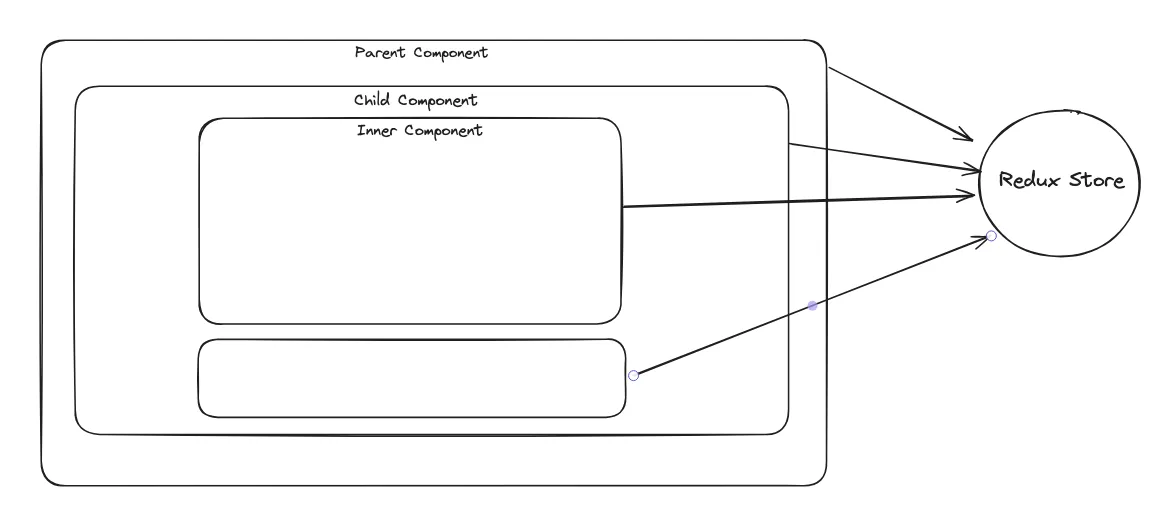
Working of Redux
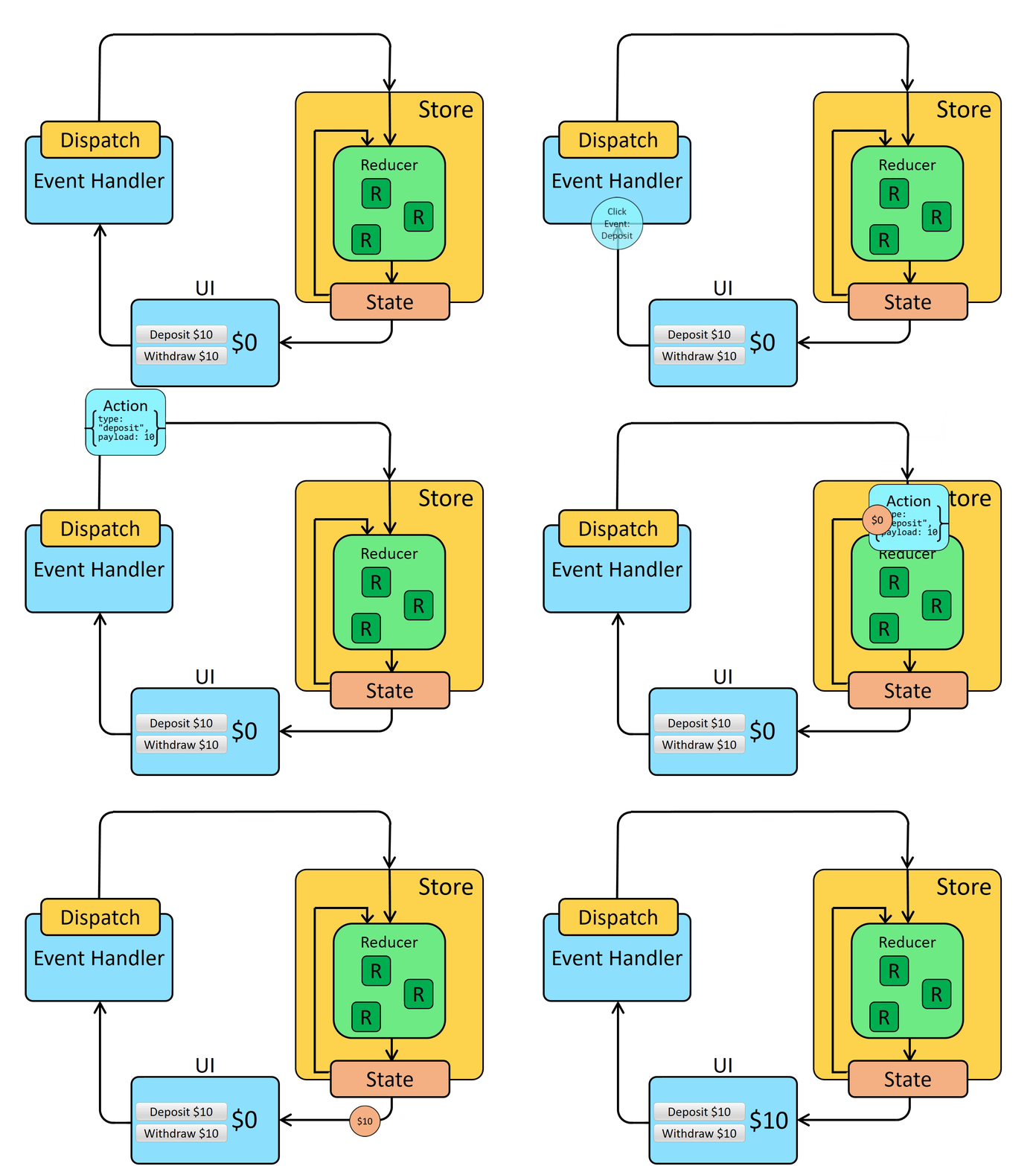
- STEPS
Configure Redux
1. Action
2. Reducerconst createBookAction= { type: 'CREATE_BOOK', payload: {id: 2, name: "New Book"} }
3. combineReducers// bookreducer.jsx // A reducer to incorporate a book into our existing book state function bookReducer(state = initialState, action) { // Verify if this action is relevant to the reducer if (action.type === 'CREATE_BOOK') { // If it is, clone the `state` return { ...state, let { book } = action.payload // and update the clone with the new data { ...book } } } // If not, return the current state without any changes return state }
4. Redux Storeimport { combineReducers } from 'redux'; import 'userReducer' from './userReducer' import 'booksReducer' from './booksReducer' const rootReducer = combineReducers({ user: userReducer, books: booksReducer }); export default rootReducer; import { createStore } from 'redux'; import bookReducer from './bookreducer' const store = createStore(bookReducer); Implementing Redux in Our User Interface
1. Globally Accessing Our Store
2. Utilizing useSelector to Access Our Stateimport { Provider } from 'react-redux' import 'store' from './store' <Provider store={store}> <App /> </Provider>
3. Executing Actions with the useDispatch Functionimport { useSelector } from 'react-redux' const books = useSelector(state => state.books) import { useDispatch } from 'react-redux' dispatch({ type: 'CREATE_BOOK', payload: {id: 3, name: "Another Book"} }) - Examples
Example 1:
              import { createSlice, configureStore } from '@reduxjs/toolkit'

const counterSlice = createSlice({
  name: 'counter',
  initialState: {
    value: 0
  },
  reducers: {
    incremented: state => {
      // Redux Toolkit allows us to write "mutating" logic in reducers. It
      // doesn't actually mutate the state because it uses the Immer library,
      // which detects changes to a "draft state" and produces a brand new
      // immutable state based off those changes
      state.value += 1
    },
    decremented: state => {
      state.value -= 1
    }
  }
})

export const { incremented, decremented } = counterSlice.actions

const store = configureStore({
  reducer: counterSlice.reducer
})

// Can still subscribe to the store
store.subscribe(() => console.log(store.getState()))

// Still pass action objects to `dispatch`, but they're created for us
store.dispatch(incremented())
// {value: 1}
store.dispatch(incremented())
// {value: 2}
store.dispatch(decremented())
// {value: 1}
Example 2:
Step 1: Install Redux Toolkit Package
npm install @reduxjs/toolkit react-redux Step 2: Establishing Our Store
              import { configureStore } from "@reduxjs/toolkit";

              import bookSlice from "./bookSlice";

              export default configureStore({
                reducer: {
                books: bookSlice,
                },
              });
Step 3: Using The Function CreateSlice()
The Redux toolkit offers a createSlice helper function that amalgamates the initial state, reducer function, and action creation. This function, which is part of the @reduxjs/toolkit package, allows us to establish a state slice in our store.
              const initialState = {
                  books: [],
              };

              // a slice for books
              const bookSlice = createSlice({
                  name: 'books',
                  initialState,
                  reducers: {
                      createBook: (state, action) => {
                          state.books.push(action.payload);
                      },
                      deleteBook: (state, action) => {
                          state.books = state.books.filter((book) => book.id !== action.payload.id);
                      },
                  },
              });

              export const { createBook, deleteBook } = bookSlice.actions;

              export default bookSlice.reducer;
Step 4: Incorporating Redux State and Actions in Component
              import { useSelector, useDispatch } from 'react-redux'
              import { createBook, deleteBook } from './counterSlice'

              export function ListBooks() {
                const count = useSelector((state) => state.books.value)
                const dispatch = useDispatch()

                return (
                  <div>
                  // to add book to the store
                  <button
                        aria-label="Increasing value"
                        onClick={() => dispatch(createBook({id: 0, name: "One more book"}))}
                      >
                  </div>
                )
Example 3
1. createSlice & reducersrc/store/auth.js
2. create storeimport { createSlice } from "@reduxjs/toolkit"; import { login as loginApi } from "../api/auth"; const initialState = { user: null, }; const slice = createSlice({ name: "auth", initialState, reducers: { setUser: (state, action) => { return Object.assign({}, state, { user: action.payload }); } } }); export default slice.reducer; export const isAuthSelector = state => state.auth.user !== null; export function login(username, password) { return async function(dispatch) { const user = await loginApi(username, password); dispatch(slice.actions.setUser(user)); } } src/store/index.js
3. Providerimport { combineReducers } from "redux"; import { configureStore } from "@reduxjs/toolkit"; import authReducer from "./auth"; const reducer = combineReducers({ auth: authReducer, }); const store = configureStore({ reducer }); export default store; src/index.js
4. authimport React from "react"; import ReactDOM from "react-dom"; import { BrowserRouter, Switch, Route, Link } from "react-router-dom"; import { Provider } from "react-redux"; import store from "./store/"; import PrivateRoute from "./components/PrivateRoute"; import GuestRoute from "./components/GuestRoute"; import Home from "./pages/Home"; import Login from "./pages/Login"; import MyPage from "./pages/MyPage"; function Menu() { return ( <nav> <Link to="/">Home</Link> {" "}|{" "} <Link to="/login">Login</Link> {" "}|{" "} <Link to="/mypage">MyPage</Link> </nav> ); } function App() { return ( <Provider store={store}> <BrowserRouter> <Menu /> <Switch> <Route path="/" exact children={<Home />} /> <GuestRoute path="/login" children={<Login />} /> <PrivateRoute path="/mypage" children={<MyPage />} /> </Switch> </BrowserRouter> </Provider> ); } const root = document.querySelector("#root"); ReactDOM.render(<App />, root); src/api/auth.js
5. pagesexport function login(username, password) { return new Promise(resolve => { resolve({ id: 123, username, email: "sample@email.com", }); }); } src/pages/login.js
                import React, { useState } from "react";
import { useHistory } from "react-router-dom";
import { useDispatch } from "react-redux";
import { login } from "../store/auth";

export default function Login() {
  const [username, setUsername] = useState("");
  const [password, setPassword] = useState("");

  const history = useHistory();
  const dispatch = useDispatch();

  const submit = async () => {
    await dispatch(login(username, password));
    history.push("/mypage");
  };

  return (
    <>
      <h1>Login</h1>
      <form onSubmit={submit}>
        <label htmlFor="username">username</label>
        <input
          type="text"
          value={username}
          onChange={e => setUsername(e.target.value)}
        />
        <label htmlFor="password">password</label>
        <input
          type="password"
          value={password}
          onChange={e => setPassword(e.target.value)}
        />
        <button type="submit">login</button>
      </form>
    </>
  );
}
src/pages/Home.js
import React from "react";

export default function Home() {
  return <h1>Home</h1>;
}
src/pages/MyPage.js
6. componentsimport React from "react"; export default function MyPage() { return <h1>MyPage</h1>; } src/components/GuestRoute.js
import React from "react";
import { Route, Redirect } from "react-router-dom";
import { useSelector } from "react-redux";
import { isAuthSelector } from "../store/auth";

function GuestRoute(props) {
  const isAuth = useSelector(isAuthSelector);

  return isAuth
    ? <Redirect to="/" />
    : <Route {...props} />;
}

export default GuestRoute;
src/components/PrivateRoute.js
import React from "react"; import { Route, Redirect } from "react-router-dom"; import { useSelector } from "react-redux"; import { isAuthSelector } from "../store/auth"; function PrivateRoute(props) { const isAuth = useSelector(isAuthSelector); return isAuth ? <Route {...props} /> : <Redirect to="/login" />; } export default PrivateRoute; - STEPS